Free PCB Visualizer App for Android
If you have ever spent hours squinting at a dense printed circuit board, trying to match a Pick and Place file to tiny surface-mount components, you know how exhausting and error-prone manual Quality Control (QC) can be.
That is why we created the PCB Global Design Visualizer—a powerful, lightweight Android app designed to make PCB inspection faster, more accurate, and completely digital.
And the best part? We are releasing it completely free for the hardware engineering community.
What Does It Do?
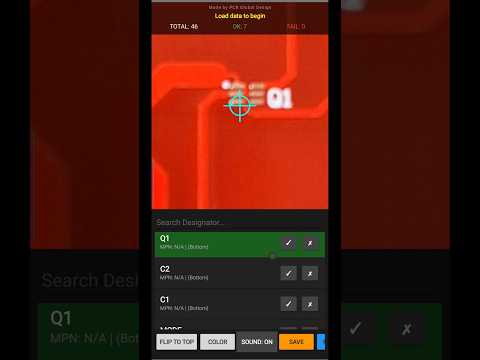
The PGD Visualizer merges your standard Pick & Place (P&P) data with high-resolution photos of your manufactured board. It acts as a "GPS for your PCB," automatically panning and centering the camera on specific components so you can verify placements, polarities, and MPNs in a fraction of a second.
Core Features
- Smart GPS Centering: Tap a designator in your list, and the app instantly pans the camera to that exact coordinate on the board.
- Dual-Layer Support: Seamlessly load both Top and Bottom photos. The app maps components to their correct sides and features a one-tap "Flip to Bottom" animation.
- Interactive QC Dashboard: Inspect boards at lightning speed. Tap "✓" (Pass) to highlight a row in Green, or "✗" (Fail) to highlight it in Orange. The live dashboard tracks your total, passed, and failed counts in real-time.
- Save & Resume (.pgd files): Don't lose your progress. Export your current session as a custom
.pgdproject file and load it up tomorrow right where you left off. - Automated Reporting: Once your inspection reaches 100%, the app generates a beautifully formatted text report of every component's status.
How to Get Started
- Load your Data: Import your standard P&P file (CSV/TXT) and tap the columns to map your Designator, X/Y locations, Layer, and MPN.
- Prepare & Load your Photos: Select high-res photos of your Top (and optional Bottom) board layers.
IMPORTANT: Before uploading, you MUST crop your photo exactly to the physical edges of the PCB. If you are providing a Gerber image, ensure it is perfectly cropped up to the board outline. The app's calibration math relies on these edges to be 100% accurate!
- Calibrate: Tap any component in the list, tap its exact location on the photo, and the app locks in the mathematical matrix for the rest of the board.
- Start Inspecting!
How to Install
- Download the
.apkfile to your Android device. - Open the file. Your phone may ask for permission to install apps from your web browser.
- Go to Settings > Security, and enable "Install Unknown Apps" for your browser or file manager.
- Click Install and start inspecting!
Open Source Credits: This application includes the 'PhotoView' library by Chris Banes, licensed under the Apache License, Version 2.0.