PGD LED Board Pro: Custom Display Controller App
Looking for a seamless way to control and customize your digital LED signs? Whether you are setting up a storefront display, a custom maker project, or a smart scrolling message board, you need software that is fast, reliable, and easy to use.
Meet PGD LED Board Pro—a powerful Android application developed by PCB Global Design that turns your smartphone into a complete command center for your digital LED displays.
What Does It Do?
PGD LED Board Pro eliminates the need for clunky PC software. It allows you to wirelessly connect to your LED matrix, type out custom messages, adjust animations, and instantly push your designs to the board in real-time.
Core Features
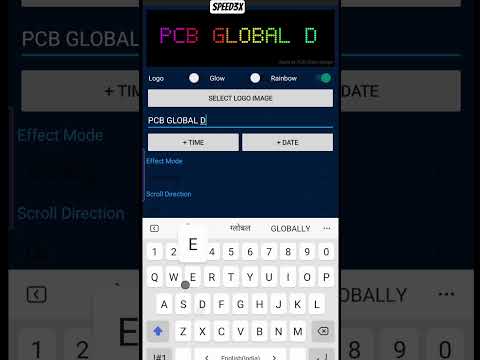
- Live Text Input: Type your message on your phone and watch it update on your LED board instantly.
- Custom Animations & Scrolling: Adjust scrolling speed, direction (left, right, up, down), and blinking effects to grab attention.
- Color & Font Control: Easily format your text with custom RGB colors, brightness levels, and distinct font styles to match your branding.
- Wireless Syncing: Send data seamlessly from your Android device directly to your LED hardware without needing USB cables.
- Save Your Layouts: Store your favorite messages and animations in the app so you can switch your display on the fly.
How to Install
- Click the download button below to get the
.apkfile. - Open the downloaded file on your Android device.
- If prompted, go to Settings > Security and enable "Install Unknown Apps" for your browser.
- Tap Install, connect to your board, and start creating!
Disclaimer & Terms of Use: This application is provided "as is", without warranty of any kind. PCB Global Design is not liable for any hardware issues or data loss resulting from the use of this software. By downloading, you agree to assume all responsibility associated with its use.